The Best Performance Marketing Tools in 2026

Performance Marketing Tools: What to Use and How to Choose
Your choice of performance marketing software should start with a specific problem. Perhaps your ads generate leads but sales rarely follow. Perhaps you need better keyword research, a manageable publishing schedule or a way to test landing pages. Each problem calls for a different type of tool.
The seven products below cover website analytics, search research, customer management, social publishing, retargeting, experimentation and audience research. Several work together, but buying the whole list would add cost and administration. Start with the gap preventing your next useful decision.
What Is Performance Marketing?
Performance marketing focuses on measurable actions such as clicks, leads and purchases. Advertisers use these results to assess campaigns and decide where to spend their budgets. Payment arrangements vary, so distinguish the result you want from the action you pay for.
Payment Models and Business Results
With cost-per-click advertising, you pay for a click whether the visitor buys or leaves. A target cost per acquisition is a bidding objective rather than a promise of a fixed price for every customer. Google Ads, for example, uses target CPA to set bids aimed at your desired average conversion cost.
Choose a business outcome before judging campaign performance. A newsletter subscription and a completed purchase have different values. For a service business, a qualified appointment might matter more than a large number of unqualified form submissions.
The Main Components
- Advertisers and publishers: Advertisers fund campaigns. Publishers and advertising platforms provide access to audiences and places to show ads.
- Payment and bidding: Establish how charges arise, how bids are set and which results guide optimisation. Keep media spending separate from software and management fees.
- Measurement: Define the actions worth recording, check the tracking setup and agree how to assess lead quality or sales value.
Benefits and Limits
Measurable actions give you a basis for comparing campaigns. You gain a clearer view of spending and recorded results, then use those figures to investigate weak points. Targeting also helps narrow the audience around a relevant need or interest.
Measurement still requires judgement. A tracked sale following an ad does not establish how much influence the ad had. A low cost per lead says little about profitability without information about qualification, sales and delivery costs. Treat campaign reports as evidence for decisions rather than a complete account of every customer interaction.
A Practical Campaign Process
- Set the goal: Choose a primary outcome and define the conditions for counting a valid result.
- Prepare the campaign: Select an audience, write the ads and build a relevant landing page.
- Check measurement: Complete the intended action yourself and verify the recorded information before increasing spending.
- Review results: Compare costs with qualified outcomes. Investigate the audience, message and landing page before deciding what to change.
For example, a campaign producing inexpensive leads needs further investigation if sales staff reject most submissions. A tool connecting those submissions with later sales stages would address a different problem from a tool suggesting more keywords.
Seven Tools for Different Marketing Jobs
These products serve different purposes. Use the descriptions to identify a suitable category first, then assess individual features against your workflow. Product access and packaging deserve a fresh check before purchase.

Google Analytics: Understand Website Activity
Google Analytics helps you examine how visitors reach your website and what happens afterwards. For campaign analysis, use a defined action such as a completed form or purchase rather than treating traffic volume as the final result.
Key Functionalities:
- Activity reports: Review website behaviour and compare the journeys associated with different campaigns.
- Action tracking: Record relevant interactions and check whether the events represent successful outcomes.
- Audience analysis: Compare groups of visitors to investigate differences in engagement and recorded results.
Practical Use:
Compare two campaigns sending traffic to the same service page. Look at completed actions alongside visits, then investigate differences in messaging or audience intent. Use the findings to form a specific question for your next campaign change.
Limits to Understand:
Realtime reporting serves a different purpose from complete campaign reporting. Google states data processing takes 24 to 48 hours, during which report figures might change. Sampling also depends on query limits and report conditions. Review the data quality indicator rather than assuming every report uses every recorded event.
Semrush: Research Search Demand and Competitors
Semrush brings together search research and website analysis. The original name SEMrush is now styled Semrush. The useful starting point is a research question, such as which terms deserve investigation or which competing offers appear in paid search.
Key Features:
- Keyword research: Build a shortlist of relevant searches for further review.
- Site auditing: Investigate technical search issues and prioritise fixes against your website’s needs.
- Advertising research: Examine competitors’ paid keywords, ad copy and historical search activity.
Practical Use:
Review competing ad messages before writing your own. Compare the service promised in the headline with the offer on the destination page. Use the research to identify missing explanations or a clearer way to describe your service.
Limits to Understand:
Competitor traffic and advertising cost figures include estimates. Treat them as research inputs rather than access to another company’s account. A competitor bidding on a keyword gives you a reason to investigate, rather than evidence of profitability. Validate your shortlist against your own campaign results.
HubSpot: Follow Leads Beyond the Form
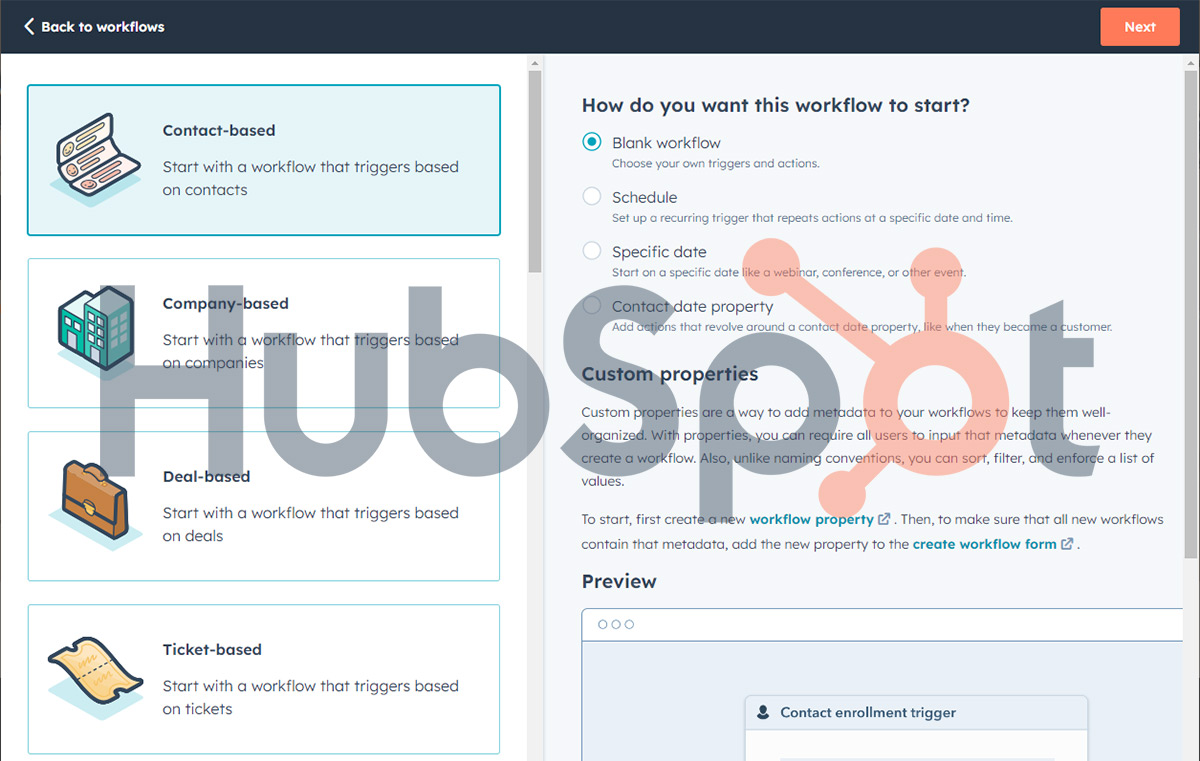
HubSpot combines customer records with marketing tools such as email campaigns and automation. The strongest reason to consider this category is a gap between generating a lead and understanding what happens during the sales process.
Key Features:
- CRM: Keep contact records and customer interactions together.
- Email marketing: Build follow-up communication for relevant groups of contacts.
- Automation: Set up repeatable marketing processes instead of handling every step manually.
Practical Use:
Define stages such as new lead, qualified lead, appointment and customer. Ask the team responsible for follow-up to keep those stages current. Then review campaigns against progress through the funnel, alongside the original form submissions.
Limits to Understand:
During a trial or demonstration, request the exact workflow your team needs. Ask which subscription includes the required automation, reporting and integrations. Budget for setup and ongoing record maintenance. Software will not resolve unclear ownership of lead follow-up or inconsistent definitions of a qualified lead.
Hootsuite: Organise Social Publishing and Responses
Hootsuite supports social media scheduling, collaboration, monitoring and reporting. Assess this category when managing content and conversations across accounts has become a regular operational problem.
Key Features:
- Scheduling: Plan and publish social content through a shared dashboard.
- Team coordination: Organise review and approval before posts go live.
- Monitoring and analytics: Review conversations and campaign performance to guide follow-up.
Practical Use:
Prepare a campaign calendar, assign responsibility for replies and review performance after publication. Keep the campaign goal visible. For a lead campaign, report website visits and qualified responses alongside social engagement rather than relying on likes alone.
Limits to Understand:
Test your actual publishing workflow on every relevant network. Ask about supported post formats, reporting coverage and the subscription required for approvals or monitoring. Compare the time saved with the work still handled inside each network. Buying a shared dashboard makes sense only when the shared process helps your team.
AdRoll: Reconnect with Previous Visitors
AdRoll provides retargeting and audience tools for advertising. Retargeting focuses on people with a previous connection to your business, such as website visitors or existing contacts, rather than treating every audience member as a new prospect.
Key Features:
- Retargeting campaigns: Reach audiences following an earlier interaction with your business.
- Audience segmentation: Build groups using sources such as website activity, CRM lists or purchase information.
- Dynamic product ads: Show previously viewed or recommended products in ecommerce campaigns.
Practical Use:
Plan separate messages for product browsers and existing customers. Someone researching a first purchase needs different information from someone considering another order. Write down the intended audience and exclusion rules before setting up the campaign.
Limits to Understand:
Ask how audience matching and cross-device reach work for your available data. Avoid assuming every visitor is identifiable across every device. Review reporting definitions and ask which interactions receive credit for a sale. Use a trial budget and a defined evaluation period instead of accepting improved conversion rates as a guaranteed outcome.
Optimizely: Test Website Changes
Optimizely Web Experimentation supports experiments on website experiences. Visitors are assigned to different variations and their actions are measured against selected goals. This gives you a structured way to compare changes rather than relying on preference alone.
Key Features:
- A/B testing: Compare versions of a website experience.
- Experiment targeting: Define the pages and audiences included in an experiment.
- Goal measurement: Assess variations against actions such as form submissions or purchases.
Practical Use:
Test a clearer explanation of your offer on a landing page. Define the primary result before launch, check both variations and document the reason for the change. If testing combinations of elements or personalised experiences, confirm the required product and experiment type first. Multivariate testing compares combinations of changes. Ask how the proposed test design fits your available traffic and what decision the results will support. Keep a record of the hypothesis, audience, start date and success measure. Use the record during review so the team assesses the original question rather than searching the results for a favourable number.
Limits to Understand:
Implementation includes adding the relevant website snippet, setting traffic distribution and checking the experiment before publication. Allow time for technical review. Web Experimentation concerns website experiences. Test advertising creative through an appropriate advertising platform experiment rather than assuming the website tool controls your ads.
Audiense: Research Audience Segments
Audiense offers audience research tools for understanding groups beyond a single demographic label. Audiense Discover covers areas such as audience segmentation, interests and media or influencer affinities. These findings help inform a campaign brief.
Key Features:
- Audience profiles: Explore characteristics and interests within a selected audience.
- Segmentation: Identify groups worth examining separately.
- Influencer and media research: Investigate the people and publications associated with those groups.
Practical Use:
Before launching a campaign, compare the interests of two audience segments. Develop a separate message hypothesis for each group, then test the response through your campaign. Use research to decide what to investigate rather than assuming an affinity guarantees a purchase.
Limits to Understand:
Ask which data sources support the specific product and report under review. Audiense’s coverage extends beyond X, formerly Twitter, so assess the available sources for your audience and market. Confirm how research findings translate into targeting options on your intended advertising platform.
Compare the Tools Before Building Your Shortlist
Feature lists are useful for finding candidates. A practical comparison also needs the job each product serves, the work required to maintain the setup and the evidence needed to assess value.
Google Analytics
Strengths
Website activity analysis helps investigate campaign traffic after arrival. A consistent measurement plan gives the team a shared starting point for discussing results.
Trade-offs
Allow time to define events and review tracking after website changes. Check reporting freshness and data quality before explaining a sudden movement as a campaign problem.
Semrush
Strengths
Search and competitor research support campaign planning. Reviewing keywords alongside ads gives more context than a keyword list alone.
Trade-offs
Research figures require interpretation. Judge the subscription against the research you regularly perform and confirm access to the specific reports you expect to use.
HubSpot
Strengths
Customer records and follow-up processes help connect marketing activity with sales work. Shared definitions make campaign discussions more useful for both teams.
Trade-offs
Assign responsibility for data quality and workflow maintenance. Request a quote based on the contacts, users and features your process requires rather than a headline entry price.
Hootsuite
Strengths
A shared publishing process helps teams coordinate posts and responses. Central reporting also provides a place to review social activity together.
Trade-offs
Compare the subscription with the specific administrative work removed. Check network and format support using real examples from your publishing calendar.
AdRoll
Strengths
Audience segmentation supports different messages for different stages of interest. Retargeting provides a way to follow up on previous interactions through advertising.
Trade-offs
Assess audience availability, measurement definitions and total campaign costs. Ask how the proposed setup handles exclusions, repeat exposure and overlapping campaigns.
Optimizely
Strengths
A defined experiment makes the hypothesis, variations and success measure explicit. This creates a clearer record of what changed and why.
Trade-offs
Budget for implementation and review as well as the software. Discuss expected traffic and outcome volume before committing to an experimentation programme.
Audiense
Strengths
Audience research supports more specific creative briefs and partnership research. Separate segments offer useful starting points for message testing.
Trade-offs
Check coverage and interpretation before acting on a profile. Establish how findings will change a campaign, rather than paying for research without a planned use.
Comparison Table
| Tool | Main Strength | What to Check |
|---|---|---|
| Google Analytics | Website and campaign activity analysis | Tracking setup, reporting delays and data quality |
| Semrush | Search and competitor research | Estimates, report access and relevance to your market |
| HubSpot | Customer records and marketing follow-up | Required plan, contact costs and team ownership |
| Hootsuite | Social publishing and team coordination | Network coverage, formats and approval needs |
| AdRoll | Retargeting and audience segmentation | Audience matching, exclusions and reporting definitions |
| Optimizely | Website experiments | Implementation, traffic and measurement plan |
| Audiense | Audience research and segmentation | Data coverage and a practical use for findings |
How to Evaluate a Tool in Your Own Workflow
Use a trial or demonstration to complete a real task. A dashboard tour shows available features. Your task reveals the effort required to turn those features into useful work.
Usability
Ask the person responsible for weekly reporting or campaign updates to try the product. Have them build a report, change a setting and find the relevant help documentation. Record where they need assistance.
Check training and support against the team’s experience. A useful onboarding session should leave someone able to repeat the task without the demonstrator. Confirm the support route and service level included in your proposed plan.
Include routine mistakes in the trial. Ask someone to find an incorrectly labelled campaign, correct a report filter and restore the intended view. Evaluate how clearly the interface explains each change. This exercise gives you a more useful assessment of usability than the number of clicks shown in a prepared presentation.
Integration Capabilities
List the information needed from your CRM, advertising accounts and analytics setup. For each connection, check the direction of data transfer, supported fields and refresh frequency. Confirm whether the connection is native or requires another paid service.
Test with a small example. Follow one lead from submission through qualification and inspect the records at each stage. Note missing fields, duplicate entries and manual steps before relying on the integration for reporting.
Ask who receives an alert when a connection fails and who has permission to reconnect the account. Agree a fallback process for the report or task affected. A working demonstration proves the connection works in the example. Your evaluation should also cover the maintenance work your team will inherit.
Cost
Compare the total expected cost over the same period. Include subscription fees, onboarding, additional users, required connectors and staff time. For advertising tools, separate media spending from platform charges.
Ask what triggers a higher bill, what happens at a usage limit and how cancellation works. Prefer a realistic quote for your expected workload over a price for a plan missing essential features.
Set a purchase criterion before the trial ends. For example, require a weekly report to take less preparation time or require the team to identify qualified leads by campaign. Write down the current process first, then compare the proposed process against the same task. Avoid assigning a financial value to time savings without checking whether the work has truly been reduced.
Scalability
Describe a plausible next stage for your business, such as another market, more client accounts or a larger contact database. Ask the vendor to show the resulting setup and cost.
Also check permissions and account ownership. Growth becomes awkward when every team member needs administrator access or when reports depend on a former employee’s personal connection.
Data and Analytics
Request a report answering one of your regular business questions. Check whether the tool uses the same definitions, date ranges and currency as your existing reports. Document differences before comparing totals.
For lead generation, specify whether the report counts submissions, unique contacts or qualified opportunities. For ecommerce, decide how to handle refunds and cancelled orders in your own reporting. These choices should be visible to everyone using the figures. Keep a short reference document so a change of team member does not silently change the meaning of a metric.
Decide who investigates discrepancies and how often reporting gets reviewed. Prioritise information supporting a decision over a large dashboard nobody uses.
Security and Data Handling
Ask about encryption, access controls, retention settings and data export. Request the relevant documentation rather than accepting a general security claim during a sales call.
Include consent handling and deletion requests in your evaluation where relevant. Ask who owns each process across your business, the software provider and connected services. A product feature alone is insufficient evidence of a complete privacy process.
Automation, Privacy and Cross-Channel Measurement
Include these areas in a current software evaluation, especially when vendors make broad promises about automatic optimisation or a complete customer view. Focus on the decisions and processes your team needs to manage.
AI and Machine Learning
Google’s target CPA bidding provides a concrete example of automated decision-making. The system sets bids using the likelihood of conversion and your desired average cost. Results still depend on the objective and information supplied to the system.
For any automated feature, ask what changes without review. Separate recommendations requiring approval from actions affecting live campaigns. Establish budget limits, responsibility for checking changes and a process for correcting mistakes.
Apply the same scrutiny to generated content, forecasts and chatbots. Review factual claims in ad copy, compare forecasts with later outcomes and check answers to common customer questions. Choose a small, repeatable task for the first evaluation rather than handing over an entire workflow.
Privacy and Security
Replace vague promises of anonymised data with questions about the actual setup. Identify which information is collected, where the information travels and who receives access. Include connected tools in the review.
Test the relevant controls during implementation. Check whether preference changes reach connected services and whether staff understand the deletion process. Review access when responsibilities change. Encryption, consent controls and clear ownership address different parts of the process, so assess each separately.
Omnichannel Marketing
A useful cross-channel setup starts with a specific journey you want to understand. For example, a retailer might want to connect an online product enquiry with a later store purchase. Define the records and identifiers needed before selecting software around a promise of a unified view.
Ask the vendor to demonstrate the connection using a sample journey. Inspect what happens when a customer changes device, uses another email address or buys without identifying themselves. Record where the connection stops and how reports describe the gap.
Before launch, assign ownership of campaign names, contact fields and reporting definitions. Have the team trace one sample record through the proposed workflow, correct missing information and repeat the check before relying on the report for budget decisions.