Business Website Strategy: Hosting, Design, SEO and Advertising
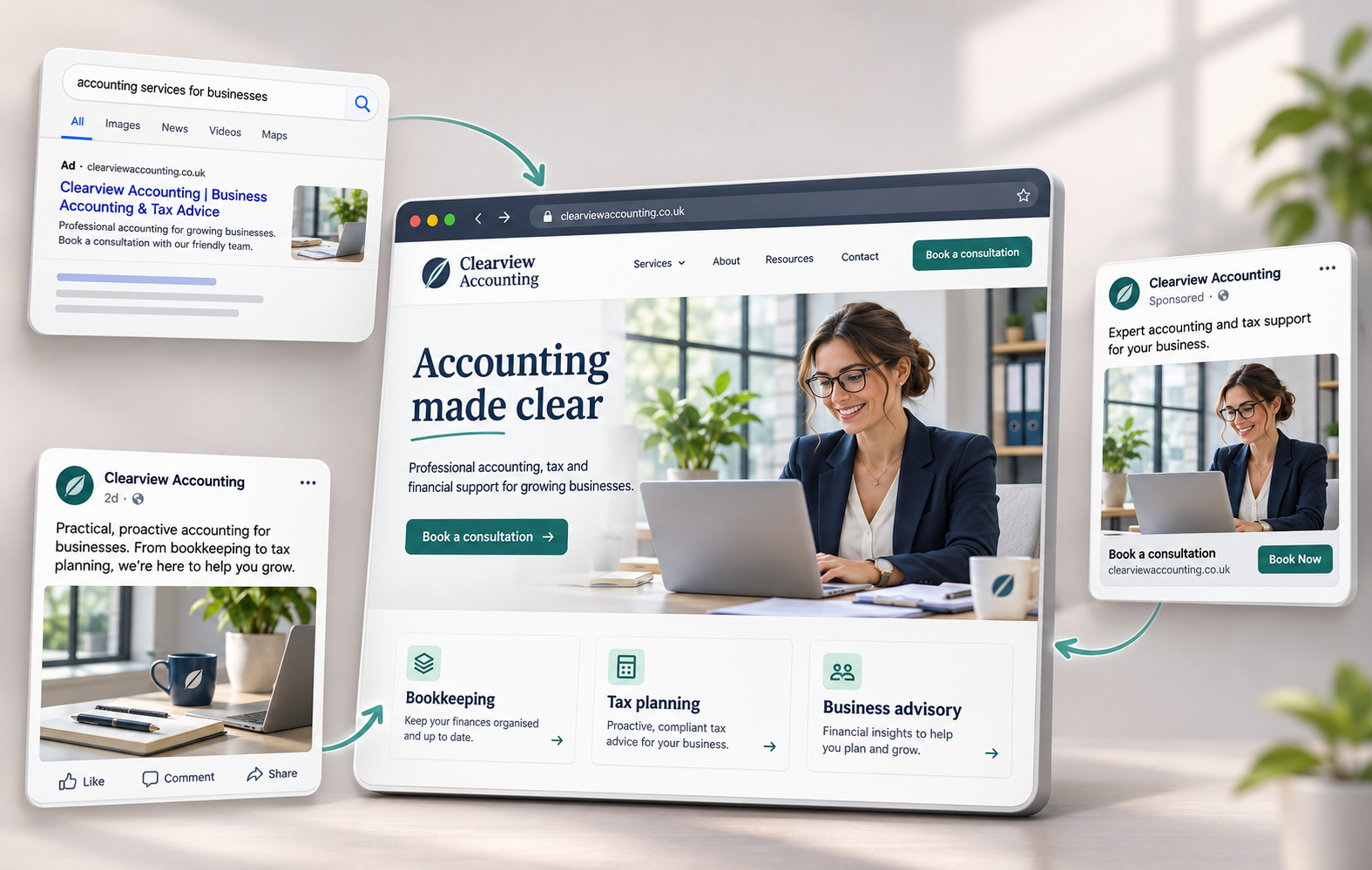
A useful business website needs a clear purpose. Visitors should understand what you offer, find the information they need and complete an action, such as buying a product or requesting a quote. Before choosing a design or launching ads, decide which action matters most and how you will measure success.
The work falls into three parts: setting up the website, making the pages useful and attracting relevant visitors. Each needs its own decisions. A fast website still needs a convincing offer. An effective ad still needs a landing page which delivers on its promise.
Choose a Domain Name People Will Recognise
Your domain should be easy to read, say and type. Start with your business name or a short variation. Read the address aloud and ask someone unfamiliar with the business to spell the name back to you.
Keep the Name Clear
Avoid unnecessary words, unusual spellings and combinations which look confusing without spaces. Numbers and hyphens deserve particular care if you expect to share the address by phone or in conversation.
A descriptive word sometimes helps distinguish your business from another with a similar name. Use one when the result sounds natural and suits your plans. Leave room for your offer to develop. A domain built around one product or location becomes awkward if the business later expands.
Compare Extensions and Renewal Costs
Consider .com alongside an extension relevant to your market or organisation. Check availability, registration terms and renewal costs before deciding. Compare the ongoing price rather than choosing solely on a discounted first year.
Check suitable social media handles too. Exact matches are useful where available, though a clear business name with a consistent variation is often more practical than changing your entire brand.
Check for Conflicting Names
Search for existing businesses and relevant trademarks before registering. Just because a domain is available does not mean you have the right to use that name. Avoid names that are identical or too similar to those of established businesses, particularly competitors in your market.
Keep the registration details and account access under your control. Record renewal dates and decide who is responsible for maintaining the domain, especially if a designer or agency registers the address during the build.

Select Hosting Around Your Website’s Needs
List what the website needs before comparing hosting plans. A small brochure site, an online shop and a membership service have different demands. Consider expected traffic, storage, software requirements and the support you need when something stops working.
Ask who will maintain the site after launch. Some businesses need a provider to handle server administration and software updates. Others have technical staff and want more control. Include this work when comparing costs.
Understand the Main Hosting Options
Shared Hosting
Shared hosting places several websites on the same server. Consider this option for a straightforward site with modest resource needs. Check the provider’s limits and upgrade process rather than assuming every shared plan offers similar performance.
Virtual Private Server Hosting
A virtual private server provides a separate server environment with allocated resources. Before choosing a VPS, establish who handles configuration, updates and monitoring. More control brings extra responsibilities unless management is included.
Dedicated Server Hosting
A dedicated server gives you an entire physical server. Assess this option when you have specific resource or configuration requirements. Server ownership alone does not guarantee speed or security. Both depend on how the system and website are managed.
Cloud Hosting
Cloud hosting covers a range of services and architectures. Ask how the particular plan handles traffic increases, outages and resource changes. Check whether scaling requires manual action and how additional usage affects the bill.
Managed Hosting
Managed hosting includes help with the technical work needed to keep your website running. Ask which updates, backups and security tasks the provider handles and who resolves problems when something goes wrong. Check what support covers, as content changes and design work may cost extra.
Fully Managed Websites
A fully managed website service combines the website build with hosting, maintenance and ongoing updates for a monthly fee. This can suit small businesses that want someone to build and look after their site, including making changes to text, photos or services. Check what the fee includes, whether there are setup costs and how you request changes. Also ask about minimum contract terms and what happens to your content and domain if you leave.
Compare Support, Backups and Limits
Look beyond storage space and headline uptime claims. Ask how to contact support, what problems the team handles and whether restoring a backup costs extra. Establish how often backups run and how long copies are retained.
Request a clear explanation of resource limits and upgrade charges. If the website takes bookings or orders, discuss those requirements before signing up. A plan should fit the actual site and the people responsible for keeping the site available.
Build Pages Around Visitor Tasks
Start with a page plan. For each page, write down the intended visitor, their main question and the action you want them to take. This gives the design and content a purpose.
A service page, for example, should explain the work, who the service suits and how to request a quote. A product page needs enough detail to help someone choose and order. Avoid making visitors search across several pages for basic information.
Make the Structure Easy to Follow
Use familiar navigation labels and group related pages together. Keep important services or products accessible through the main navigation or relevant category pages.
Add internal links where the next page helps the reader. A guide explaining a problem might link to a relevant service. A product comparison might link to the products discussed. Use descriptive link text so visitors understand the destination before clicking.
Keep contact details and the main next step easy to find. Review the page from a first-time visitor’s perspective, especially if your team already knows the business terminology.
Write Useful Content and Prepare Images
Explain what you offer in plain language. Include practical details such as dimensions, availability, service areas or the information needed for a quote. Replace broad claims about quality with examples or evidence you are entitled to publish.
Resize and compress images for their intended use. Check the result on different screens so important details remain clear. Write appropriate alt text for meaningful images and avoid using images as the only way to communicate essential information.
Test Responsive Layouts
Check the website at narrow and wide screen sizes. Try opening menus, completing forms and following the main purchase or enquiry process. Watch for overlapping text and buttons hidden behind banners.
Bootstrap provides responsive layout tools, while CSS Grid supports arranging content in rows and columns. Either approach still needs testing with real content. A layout working in a demonstration might struggle with longer headings or different images.
Before promotion begins, ask someone unfamiliar with the site to complete its main task. Note where they hesitate and fix confusing steps.
Plan Promotion Before Spreading Your Budget
Choose channels according to your audience, offer and budget. Paid search, Meta advertising, LinkedIn campaigns and organic content serve different purposes. You do not need to launch every channel together.
Write a short plan for each test: who you want to reach, what you are offering, where visitors will land and which outcome you will measure. Set a spending limit and a date to review the results.
Connect the Ad With the Landing Page
Send visitors to a page matching the ad’s promise. If an ad promotes a particular service or product, show the relevant details prominently on the destination page.
Repeat important terms accurately, including prices, eligibility and availability. Check the experience after clicking from a phone. Confirm the page loads, the offer makes sense and the form or purchase process works.
Define Success Before Launch
Decide whether you are measuring orders, qualified enquiries, bookings or another outcome. Record how you will distinguish a useful lead from spam or an unsuitable request.
Use visits and clicks to diagnose performance, then assess the campaign against its business goal. A low click price is useful only when the resulting visitors contribute to the outcome you need.
Use Paid Search to Reach Relevant Searches
Paid search places ads alongside search results through an auction. This section uses “search engine marketing” or SEM to mean paid search, keeping the discussion separate from organic SEO.
Choose this channel when you want to test demand around searches relevant to your offer. Start with the product, service and buying questions your intended customers are likely to use.
Understand What Paid Search Provides
- Control over the test: Set a budget, choose locations and select the searches you want to target.
- Relevant destinations: Match groups of related searches with suitable ads and landing pages.
- Measurable actions: Compare spend with recorded enquiries or purchases, then review the quality of those results.
Paying for an ad does not guarantee a position above organic results or immediate sales. Google uses Ad Rank to determine eligibility and placement, considering factors including bids, ad quality and the landing page.
Prepare the Campaign
- Research keywords: Use Google Keyword Planner to investigate relevant searches and possible costs. Treat forecasts as planning estimates.
- Group related searches: Keep each group focused enough for the ad and landing page to address the same need.
- Write specific ads: Explain the offer, relevant conditions and the next step. Avoid promises the landing page fails to support.
- Test measurement: Complete an enquiry or purchase yourself and check whether the expected action is recorded correctly.
Review Search Quality
After launch, review the searches associated with your traffic and the enquiries they produce. Look for unrelated meanings, unsupported locations or requests for products you do not sell.
Use those findings to refine targeting and exclusions. Keep a record of changes so you understand what happened between reviews. If clicks arrive without useful results, inspect the search intent and landing page before increasing the budget.
For enquiry campaigns, connect advertising reports with follow-up outcomes. A form submission and a qualified sales opportunity are different stages.
Run Meta Campaigns Around a Clear Action
Before advertising on Facebook or Instagram, define the action you want people to complete. A purchase, an enquiry and a newsletter signup have different business values. Choose the outcome which fits the offer and your ability to follow up.
Check the objective, optimisation options and billing settings available in your account before publishing. Keep the delivery goal and charging method separate when reviewing the setup.
Understand Cost Per Action
Cost per action, or CPA, describes spend divided by the number of recorded actions. For example, spending €200 for ten recorded enquiries gives a CPA of €20.
Review what counts as an action. Ten enquiries are worth less if most are spam, outside your service area or unrelated to your offer. Calculate the cost per qualified enquiry alongside the platform’s reported figure.
A campaign optimised towards an action should still have a spending limit. Do not assume optimisation provides a guarantee of results or a promise to charge only after a sale.
Give the Creative a Specific Job
Use the image or video to show the product, demonstrate the service or explain the problem your offer addresses. Make the main point understandable without relying on a long caption.
Prepare a few distinct approaches. For a product, compare a demonstration with a customer use case. For a service, compare an explanation of the process with an example of the finished work. Keep claims and conditions consistent with the destination page.
Check Audience Settings and Results
Review the available audience controls and their effect on delivery. Confirm locations and any restrictions relevant to the offer. Record the settings used for each test rather than assuming every targeting choice works as a fixed limit.
Compare the complete path from ad to outcome: clicks, landing page activity, recorded actions and qualified results. Investigate gaps before making changes. If visitors arrive but abandon the form, changing the audience alone is unlikely to resolve an unclear or broken form.
Use LinkedIn ABM for Defined Business Accounts
Account-based marketing, or ABM, starts with the organisations you want to reach. Define the types of companies which fit your offer, then decide who inside those companies needs the information.
Use a manageable account plan. Record why each company fits, which problem you expect to address and what evidence supports the offer. Avoid creating personalised copy based on assumptions about a company’s internal problems.
Build the Target Account Audience
LinkedIn supports company list targeting through Matched Audiences. Company websites or LinkedIn Page URLs help identify organisations in the upload. Review the matched audience and apply relevant location or role criteria.
Check requirements before planning a narrow campaign. LinkedIn’s current company list documentation specifies at least 300 rows for an upload and at least 300 matched member accounts for an active audience. These are separate requirements. Additional targeting narrows the audience further.
Match Content to the Buying Decision
Group accounts with similar needs when you lack the resources for individual campaigns. Prepare content addressing a specific decision, such as implementation requirements, a comparison or the work involved in switching suppliers.
A case study should explain the starting problem, the work completed and the result, using details you have permission to share. Link to a relevant page where interested readers have a sensible next step.
Select an Appropriate Ad Format
Sponsored Content and Sponsored Messaging provide different ways to present the offer. LinkedIn’s current Sponsored Messaging formats are Message Ads and Conversation Ads, replacing the draft’s “Sponsored InMail” wording.
Check the format’s availability and requirements for your audience before planning the campaign. Choose a format because the experience suits the message. A document, short explanation and invitation to speak each ask for different levels of attention.
Measure Account Progress
Agree with sales on what happens after someone responds. Record the account, role, interest and agreed next step. Avoid judging an ABM campaign solely on click-through rate.
Review which target accounts engage, which produce useful conversations and which progress towards a sale. Keep the longer buying process visible when assessing cost. A lead requiring several months of follow-up needs a different review from an immediate online purchase.
Make the Website Useful for Organic Search
SEO involves helping search engines understand your pages and helping searchers find relevant information. Begin with the questions your customers ask and the pages needed to answer them.
Review existing pages before commissioning more content. Missing service details or an outdated product description deserve attention before another general article.
Give Each Page a Clear Purpose
Write a page around a specific service, product or question. Explain the subject in language your audience uses. Include relevant detail rather than repeating a search phrase throughout the text.
For example, a service page might explain the work included, the locations covered and the information required for an estimate. An article might compare two approaches and explain when each suits the reader.
Use headings to organise the explanation and links to connect related pages. Update practical details when the offer changes. Keep someone responsible for reviewing important pages rather than leaving old information indefinitely.
Write Descriptive Titles and Descriptions
Give each page a concise, distinct title describing its content. Write a relevant meta description which helps a searcher understand the page.
These elements influence the search result, though Google generates title links and snippets from several sources. The displayed result is not guaranteed to reproduce your preferred wording. Check whether the page content supports the description you want people to see.
Earn Relevant References
Look for reasons other websites would find your content worth referencing. Examples include original research, a useful explanation or a resource supporting a shared project.
Approach relevant publications with something useful for their readers. Avoid treating every collaboration as a way to obtain a ranking link.
Google identifies buying ranking links and certain manipulative guest posting practices as link spam. Paid advertising links need appropriate qualification. Assess a placement by its relevance and value to readers rather than promises about authority.
Review Organic Results Separately
Track which pages attract relevant search visitors and what those visitors do next. An article attracting readers with no interest in your products serves a different purpose from a service page generating enquiries.
Use the findings to improve content and internal links. Keep expectations realistic about the time and work involved. Organic traffic still has production and maintenance costs, even without a charge for each click.
Give Social Media Posts a Reason to Lead to the Website
Choose social channels where you have a clear audience and something useful to contribute. Decide what people receive from following the account and why they would visit your site.
Plan posts around actual questions, examples and updates. A demonstration showing one useful detail is easier to assess than a general claim about your business.
Connect Posts With Relevant Pages
Give each post a specific point. Show a process, answer a buying question or explain a change. When a website link fits the post, send readers to the relevant page.
For a longer article, share a useful example or finding in the post itself. Explain what further detail the full article provides. Use a link route suitable for the platform and keep the destination easy to identify.
Evaluate Creator Partnerships
Review a potential partner’s content, audience and previous commercial work. Ask what the collaboration includes, how promotion will be identified and how you will assess results.
Agree on permissions before reusing content. Clarify whether the arrangement covers your own posts, website use or paid advertising. Plan a limited test before committing to repeated work.
Use Interaction to Improve Content
Respond to useful questions and note topics which keep appearing. Turn repeated questions into clearer posts or website explanations.
Measure website visits and relevant actions alongside reach and engagement. A post starting valuable conversations deserves a different assessment from one collecting reactions without further interest. Use the outcome to decide what to repeat and how much time to spend on the channel.
Measure Outcomes and Decide What to Change
Create a reporting routine before campaigns become difficult to compare. Record spend, the outcome being measured and the period covered. Use consistent campaign names and keep a log of major changes.
Decide who owns tracking checks and who reviews the business results. Advertising reports and sales records need to answer related questions, especially when enquiries take time to become customers.
Choose KPIs With a Business Purpose
Key Performance Indicators (KPIs) should help you make decisions. Start with qualified enquiries, purchases, revenue or another relevant outcome. Use traffic and engagement measures to investigate why results changed.
State how each rate is calculated. If you report a conversion rate, identify the action and whether the denominator is visits, users or clicks. Compare like with like across periods.
Use Google Analytics or another suitable analytics service to investigate traffic and website actions. Compare recorded enquiries or sales with business records so missing, duplicate or unsuitable actions do not distort your decisions.
Separate Revenue From Profit
Return on ad spend compares attributed revenue with advertising spend. This leaves out costs such as production, fulfilment and staff time.
Decide which costs belong in your profitability assessment. For lead generation, examine the proportion of enquiries becoming customers and the value of those customers. Keep assumptions visible, especially when using projected repeat purchases or long-term value.
Run Tests With a Clear Question
A/B testing compares alternatives against a defined outcome. Write down the problem, proposed change and success measure before starting.
For example, test whether explaining delivery terms near the order button improves completed purchases. Keep other major changes separate so the result is easier to interpret.
Set a review plan and avoid declaring a winner after a few results. When the evidence is inconclusive, record the uncertainty. For a site with limited traffic, watching people complete a task or reviewing failed enquiries often provides useful direction for the next change.