Email Marketing Automation: How to Build and Measure a Workflow
Email marketing automation sends messages when someone meets a condition, such as joining a mailing list or buying a product. You decide who enters the sequence, which emails they receive and when the sequence stops.
A useful starting point is a task you already repeat. For example, a training provider might send every new subscriber a course guide, an explanation of entry requirements and an invitation to book a call. Automation handles the scheduled delivery while staff answer individual questions.
How an Automated Email Sequence Works
A workflow connects a trigger to a series of actions. The trigger starts the process. Actions include sending an email, waiting for a set period or updating a contact record. Conditions determine which route a subscriber follows.
A drip campaign usually follows a planned schedule. A workflow with branches changes the next action according to information about the contact. Someone who books a consultation should leave the booking promotion and receive relevant preparation information instead.
Where Automation Saves Work
Once configured, a sequence removes the need to prepare each recurring send manually. New subscribers receive the planned introduction without waiting for your next newsletter. Staff spend less time checking lists and scheduling individual follow-ups.
The work shifts towards setup and maintenance. You still need to write the emails, check the data and review results. An outdated offer sent automatically creates the same problem repeatedly, so assign someone responsibility for keeping each sequence accurate.
Personalization Starts with Relevant Information
Adding a first name changes the greeting. Useful personalization changes the information someone receives. A subscriber interested in beginner classes needs different details from an experienced customer looking for advanced training.
Use declared interests, purchase history or relevant interactions to form groups. Keep the first version simple. Two groups with different needs offer a clearer starting point than ten loosely defined personas receiving almost identical emails.
Build One Workflow Around a Clear Goal
Choose an outcome before writing the sequence. For a service business, the goal might be a consultation booking. For a software company, the goal might be completing an account setup task. Connect every email to a useful step towards this outcome.
Define the Audience and Entry Rules
Write down the entry condition in plain language. For example, enrol new marketing subscribers who selected beginner courses on your signup form. Exclude existing course customers from introductory sales messages.
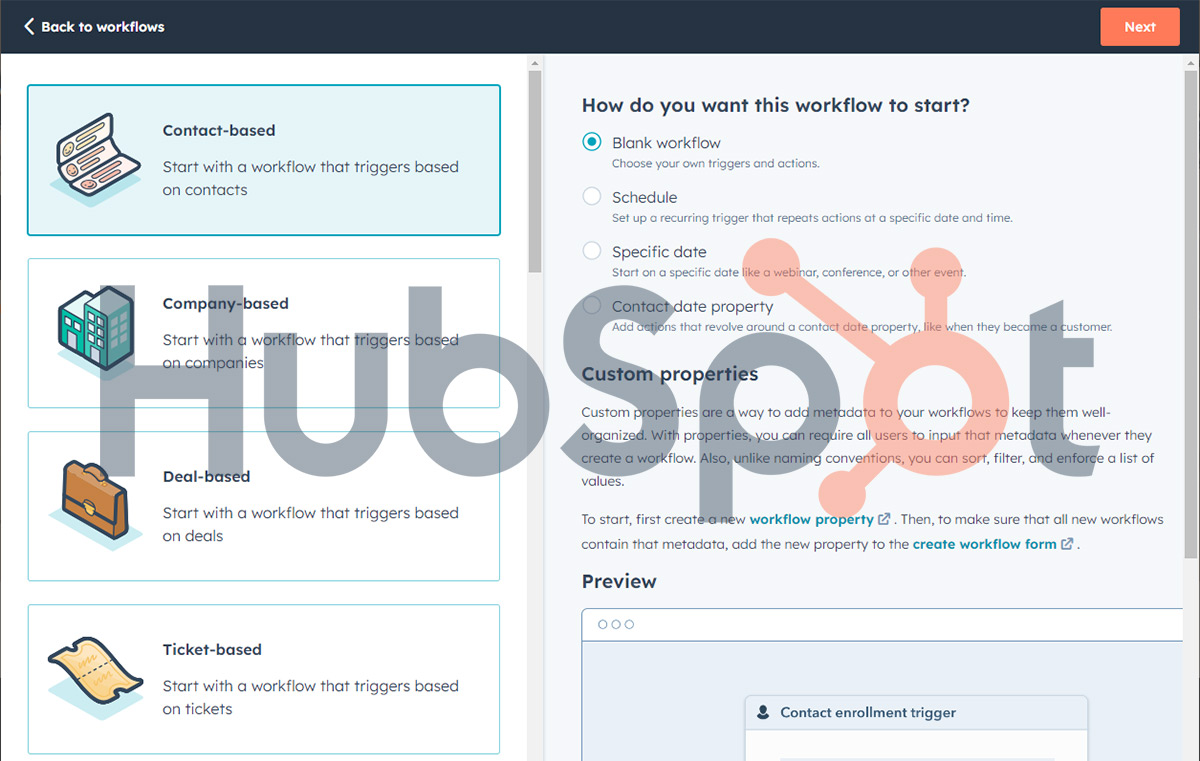
Check whether launching the workflow will enrol existing contacts as well as future subscribers. HubSpot, for example, provides a choice during publication. Review this setting before activation to avoid unexpectedly sending an introductory sequence to an established audience.
Map the Messages and Exit Conditions
For the training provider, a first draft might follow this schedule. These timings are an example to test against your own audience:
- Immediately after signup, send the requested guide and explain which follow-up emails the subscriber should expect.
- Two days later, explain entry requirements and link to the relevant course details.
- Five days after signup, answer common questions about schedules and fees, then offer a booking link.
- Remove contacts from the promotional sequence after a booking or purchase. Exclude anyone who withdraws permission to receive marketing.
Decide whether repeat form submissions should restart the workflow. Someone requesting the guide twice should not receive two overlapping copies of the same sequence. Document this rule alongside the timing and exit conditions.
Write Each Email for One Task
Give each message a clear purpose and a main action. An email about course availability should lead to the relevant schedule or booking page. Avoid sending readers to a homepage where they need to search again.
Use subject lines describing the contents accurately. Explain the practical details readers need before acting, including relevant costs or requirements. Add images where they help explain the offer and check the email on a phone before launch.
Choose Software Around the Workflow
Mailchimp, Constant Contact and HubSpot all offer email automation. Their available triggers, workflow controls and subscription requirements differ. Compare the sequence you need with the features included in the specific plan under consideration.
Mailchimp
Mailchimp calls its builder Marketing Automation Flows. The builder supports triggers, time delays, conditional splits and actions such as sending emails or adding tags. Access to features depends on your plan. Check the required steps before choosing a subscription.
Constant Contact
Constant Contact uses an Automation Path Builder with predefined templates. Its current documentation reserves custom paths and ecommerce automation features for Premium. Check whether a template covers your sequence before assuming a lower plan supports your intended workflow.
HubSpot
HubSpot provides limited simple automation with Marketing Hub Starter, including email-based workflows. Its full workflows tool requires an eligible Professional or Enterprise subscription. Confirm the subscription requirements for your intended marketing email actions as well as access to the workflow builder.
Beyond the builder, check how customer information reaches the platform. Confirm whether your booking or checkout system supplies the events needed to start and stop messages. A purchase-based exit rule depends on purchase information arriving correctly.
Related content:
=> Marketing Automation with HubSpot
=> A Comprehensive Comparison of Mail Merge Solutions
Measure Outcomes and Check Misleading Signals
Choose a primary measure matching the workflow’s goal. Track bookings for a consultation sequence or completed purchases for a sales sequence. Review individual emails to locate problems within the path.
Use Opens with Caution
Apple Mail Privacy Protection preloads tracking images, including when a recipient has not read the message. As a result, recorded opens do not reliably establish whether someone read an email. Avoid using opens alone to trigger follow-ups or identify inactive subscribers.
Clicks also need scrutiny. Automated security systems scan links and inflate click figures. Use your platform’s bot filtering where available and compare email activity with completed forms, bookings or purchases.
Keep Metric Definitions Consistent
Record how you calculate each rate. For example, measure email click rate as unique recipients with a recorded click divided by delivered emails. For the overall workflow, you might measure bookings divided by enrolled contacts.
Track bounces, unsubscribes and complaints alongside the main outcome. Compare results over consistent time periods. For a longer sequence, allow contacts enough time to finish before evaluating their results.
Test One Meaningful Change
For an A/B test, choose one difference, such as the subject line or main call to action. Keep other elements consistent and choose the success measure before sending. Avoid selecting a subject-line winner purely from open rates.
Small audiences often produce inconclusive results. Treat a small difference across a handful of bookings as a reason for further observation. Record the change and outcome so later decisions have a useful reference.
Build Permission and Privacy into the Process
Check the rules applying to your audience and business before activating marketing emails. A collected email address does not automatically establish permission to send an ongoing promotional sequence.
In Ireland, GDPR applies alongside the ePrivacy Regulations. The general rule requires affirmative consent for electronic direct marketing. A limited existing-customer exception covers a business’s own similar products or services when all conditions are met. These include lawful collection during a sale, an opt-out at collection and in every marketing message, plus an initial marketing message within 12 months of the sale.
For US commercial email, CAN-SPAM sets requirements including accurate sender details, truthful subject lines, advertising identification, a valid postal address and a clear opt-out. Opt-out requests must be honoured within 10 business days. Permission requirements differ across jurisdictions, so avoid treating one country’s rules as a global standard.
Keep records of signup wording and preferences. Limit access to subscriber information and test whether an unsubscribe excludes the contact from later marketing steps. Separate promotional workflows from necessary service communications so each message follows the appropriate rules.
Test the Full Path Before Launch
Run test contacts through each route, including a new subscriber, an existing customer and someone who books midway through the sequence. Check timing, links, personalization fallbacks and exit rules. Confirm whether contacts already meeting the entry conditions will join when you publish.
After launch, inspect the first group of enrolled contacts. Compare their activity with your intended sequence and investigate missed or duplicate messages. Schedule reviews of offers, links and timing, with an owner responsible for pausing emails when the underlying information changes.